Showing posts with label HOW TO'S. Show all posts

How To Prevent MTN From Touching Your Credit After Exhausting Your Data

Well some times ago I was transferred a few credit by friend on MTN line out of which I used part of it to subscribed. While browsing I keep monitoring my data usage to avoid my credit being dedicated when have exhausted my data. I couldn't browse confidently, so I decided to call the MTN Nigeria customer care to ask if there is any code I can dial to avoid my credit being  touched if I eventually exhaust my data.
I was given some  code which worked for me and will like to share with you guys.
Whenever you guys subscribe to any data plan and you've been given the data, dial *131*201# to avoid your credit from being touched once you exhaust your data while still browsing. So MTN wont zap your available airtime balance.


Mind you, dialing that code means you won't be able to browse with money on your phone when there isn't any data.

Even if you have thousands of credits on that line, and your data is switched on, you won't be able to browse unless you have data or buy data with the credit. But if u are in a tight corner where the money available on your line is not up to the amount you can use in buying data and u wanna browse with the money, then dial *131*200#. The code allows you to browse with money in the absence of data.

A lot of people already shared this post. Do the same and help your friends prevent MTN from zapping their credit.

Well some times ago I was transferred a few credit by friend on MTN line out of which I used part of it to subscribed. While browsing I keep monitoring my data usage to avoid my credit being dedicated when have exhausted my data. I couldn't browse confidently, so I decided to call the MTN Nigeria customer care to ask if there is any code I can dial to avoid my credit being  touched if I eventually exhaust my data.

I was given some  code which worked for me and will like to share with you guys.
Whenever you guys subscribe to any data plan and you've been givn the data, dial *131*201# to avoid your credit from being touched once you exhaust your data while still browsing. So MTN wont zap your available airtime balance. 


Mind you, dialing that code means you won't be able to browse with money on your phone when there isn't any data. 

Even if you have thousands of credits on that line, and your data is switched on, you won't be able to browse unless you have data or buy data with the credit. But if u are in a tight corner where the money available on your line is not up to the amount you can use in buying data and u wanna browse with the money, then dial *131*200#. The code allows you to browse with money in the absence of data. 

A lot of people already shared this post. Do the same and help your friends prevent MTN from zapping their credit.
- See more at: http://www.naijatechlovers.com/2016/07/how-to-prevent-mtn-from-touching-your.html#.V4s_fE_FMy4
Well some times ago I was transferred a few credit by friend on MTN line out of which I used part of it to subscribed. While browsing I keep monitoring my data usage to avoid my credit being dedicated when have exhausted my data. I couldn't browse confidently, so I decided to call the MTN Nigeria customer care to ask if there is any code I can dial to avoid my credit being  touched if I eventually exhaust my data.

I was given some  code which worked for me and will like to share with you guys.
Whenever you guys subscribe to any data plan and you've been givn the data, dial *131*201# to avoid your credit from being touched once you exhaust your data while still browsing. So MTN wont zap your available airtime balance. 


Mind you, dialing that code means you won't be able to browse with money on your phone when there isn't any data. 

Even if you have thousands of credits on that line, and your data is switched on, you won't be able to browse unless you have data or buy data with the credit. But if u are in a tight corner where the money available on your line is not up to the amount you can use in buying data and u wanna browse with the money, then dial *131*200#. The code allows you to browse with money in the absence of data. 

A lot of people already shared this post. Do the same and help your friends prevent MTN from zapping their credit.
- See more at: http://www.naijatechlovers.com/2016/07/how-to-prevent-mtn-from-touching-your.html#.V4s_fE_FMy4
Well some times ago I was transferred a few credit by friend on MTN line out of which I used part of it to subscribed. While browsing I keep monitoring my data usage to avoid my credit being dedicated when have exhausted my data. I couldn't browse confidently, so I decided to call the MTN Nigeria customer care to ask if there is any code I can dial to avoid my credit being  touched if I eventually exhaust my data.

I was given some  code which worked for me and will like to share with you guys.
Whenever you guys subscribe to any data plan and you've been givn the data, dial *131*201# to avoid your credit from being touched once you exhaust your data while still browsing. So MTN wont zap your available airtime balance. 


Mind you, dialing that code means you won't be able to browse with money on your phone when there isn't any data. 

Even if you have thousands of credits on that line, and your data is switched on, you won't be able to browse unless you have data or buy data with the credit. But if u are in a tight corner where the money available on your line is not up to the amount you can use in buying data and u wanna browse with the money, then dial *131*200#. The code allows you to browse with money in the absence of data. 

A lot of people already shared this post. Do the same and help your friends prevent MTN from zapping their credit.
- See more at: http://www.naijatechlovers.com/2016/07/how-to-prevent-mtn-from-touching-your.html#.V4s_fE_FMy4
Well some times ago I was transferred a few credit by friend on MTN line out of which I used part of it to subscribed. While browsing I keep monitoring my data usage to avoid my credit being dedicated when have exhausted my data. I couldn't browse confidently, so I decided to call the MTN Nigeria customer care to ask if there is any code I can dial to avoid my credit being  touched if I eventually exhaust my data.

I was given some  code which worked for me and will like to share with you guys.
Whenever you guys subscribe to any data plan and you've been givn the data, dial *131*201# to avoid your credit from being touched once you exhaust your data while still browsing. So MTN wont zap your available airtime balance. 


Mind you, dialing that code means you won't be able to browse with money on your phone when there isn't any data. 

Even if you have thousands of credits on that line, and your data is switched on, you won't be able to browse unless you have data or buy data with the credit. But if u are in a tight corner where the money available on your line is not up to the amount you can use in buying data and u wanna browse with the money, then dial *131*200#. The code allows you to browse with money in the absence of data. 

A lot of people already shared this post. Do the same and help your friends prevent MTN from zapping their credit.
- See more at: http://www.naijatechlovers.com/2016/07/how-to-prevent-mtn-from-touching-your.html#.V4s_fE_FMy4

HOW TO ADD ADSENSE AD IN THE MIDDLE OF ANYWHERE IN BLOGGER POSTS

In a previous post we saw how and where we can place Adsense ads on our blog, however, these methods would only allow us to place ads on predetermined fixed locations and the common areas are the beginning of the post and/or the end of the post
 But what if we want to display an Adsense in the middle of a post?

Today I will show you how you can manipulate the location of the ads to be displayed by adding a script inside the template and using a tag inside our post to where we want the Adsense ad to appear. Once added, we can place the ads anywhere, be it between paragraphs or in the middle of the content etc.

Usually the advice is that you fully backup your template(go to Template >click on Backup/restore buttton)

Step 1 First thing we need to do is to "Parse" the Adsense code, in other words, convert it to plain text.
Then go to Template, click on the Edit HTML button, click anywhere inside the code area and lood for this tag below using CTRL + F

Note: you may find it several times, but we need to stop at the second one or if you can't see any changes, test the third one

Step 2. Replace the tag with this code:


Download the above code Here
Step 3. Put the converted Adsense code to where you see the annotation, then save the changes by clicking on the Save template button.
Note: For centering ads, add the center tag before and after the AdSense code, like this:


Step 4. When you create a New Post, add this tag inside the HTML section to where you want the Google AdSense ads to appear:
For example:

Note: If you don't add the label to bring up the ad, then the ad will appear below the title by default.
And you don't have to worry about violating the Google's Terms of Service because applying this method we are not changing the structure of the ad.

HOW TO ACCESS A BLOCKED WEBSITE

6 EASY WAYS TO ACCESS A BLOCKED WEBSITE


Given the current stature of the constitutional “Rights” and “Freedoms” conferred upon the public in most of the democracies, censorship and bans on trivial matters often come as a surprise. And in the era of the Internet, harassing the general public is even easier. Be it the controversial net neutrality, or restriction to access to specific websites.

If you also feel stifled by the blocked websites then here are some ways to access blocked websites:


1. Become Anonymous: Use Proxy Websites

A proxy website becomes a moderator between the user and server site. The proxy website camouflages the blocked site from the ISPs and allows you to access blocked websites. To get a proxy website for any blocked site, just perform the Google search.

Eg: Facebook Proxy Server. In case, Facebook is blocked in your institution, or you can go to

http://www.spysurfing.com/

http://proxify.us/p/ and more…


2. Use VPN

VPN or Virtual Proxy Network allows you to connect your device to a secure connection to another network over the internet. VPN enables you to access blocked websites from your home network and puts your IP address in a land far away. You can also download the apps or open the sites blocked in your country.


3. Use IP Rather Than URL

The blocked website sometimes are stored as a list of URLs and using IP of the website might work in few of the cases. To get the IP address for any website, you do a ping domain.com command in Command Prompt.

Using IP is a simple way to access blocked websites in your region. However, if the website had hidden its IP too, then it won’t open with this method.


4. Change Network Proxy In Browsers

Your college or institute might be having more than one proxy for its network. So, it happens that some websites are restricted on one proxy, but accessible in another. So, you can give a try to proxy surfing to access blocked websites in your college.

Change the advanced settings of your Firefox browser and select the Manual Proxy. Put the bypass proxy under HTTP proxy.


5. Use Google Translate

Institutes or even countries sometimes don’t ban Google Translate. So, you can bypass the restriction by converting the blocked website into some other language that you may know. Try Google Translate and see for yourself. It is yet another simple way to access blocked websites.


6. Bypass via Extensions

If the websites that are blocked by your institute or office are dynamic in nature such as Facebook or YouTube, then should give a try to these extensions. Hola and ProxMate are some extensions that you can use to access blocked websites.

These are some of the most effective and easy to use methods to circumvent the censorship that has been put on your favorite websites. Let us know which one do you prefer to access blocked websites in your region.

SOURCE 

HOW TO BE ELIGIBLE FOR AIRTEL 4GB AND 9GB DATA PLAN

Unfortunately, It’s not everyone that fall in love with Airtel network. I have used it over and over again and I love it for the speed of accessing the internet  and doesn’t zap my data on PC. I know many still want to sub for the airtel Android 1+1 package but are not eligible for this offer which is so super annoying. It sounds too good to get 9Gb for #3,500 or 4GB for #2k and it will last you for 2months.


Those of you using PC, just go to your computer and disable window updates completely; set it to no update. I don’t know what your system want to update to… abi is it to window 9.5?..lol

Any way, this post is majorly put up for those who want to subscribe for Airtel 2in1 Android package but are not eligible for the offer. Just follow me carefully and I bet we’ll arrive at a safe destination

How Can I be Eligible For Airtel Android 2in1 Offer?

I got this from a colleague and it has got some individuals eligible for the Airtel 1+1 offer; so you too should be eligible after trying it.
==>Send a simple message to this number 08022266653 e.g “kindly make my number 080*** to be eligible for 1+1 offer. Or type a short message and you’ll be sent an eligible text message.
Atleast this offer will suite the Airtel diehard fans. Give it a try and enjoy your luck.
==> Secondly, You can contact the customer care and request for it too

But remember, it works on all device.


How to Install Whatsapp on s40 Java Phones Like Asha 200 & 205

This tutorial will guide you to install Whatsapp messenger on your non-supported java phones like the Nokia Asha 200, Asha 205 and any other non-supported java phones.
Please take note you need to free up your internal memory before proceeding, at least have more than 4MB free.
1. Download the Raw file from here note the file is a zipped file.

2. unzip the downloaded zipped file, then copy the whole folder to your memory card (advisable to do this step on a computer).

3. Now goto the folder, DO NOT launch the whatsapp application inside the folder just yet.

4. Copy the application from the memory card to your My Apps or Games.

5. Now go back to the initial folder and delete it.

6. Now go to the whatsapp application in your phone, click the option button and click update version, let it update then you can open the application…thats all.

It might ask for update and upgrade, dont worry, just allow it to upgrade and update.

Your comments matters...also if this post helped you remember to LIKE our FB page

HOW TO TRANSFER MB ON NAIJA VARIOUS NETWORKS

 
-------- To transfer on MTN-------
Nw follow d steps.

Dial on ur phone: *131*2*3# den it wuld popup requestin for a pin. Dnt panic, jst dial 0000 bt if d pin Doesnt work

____ dial *131*2*2*0000*new pin# dats all nd
follow d requested steps.

 
____________________________
_-----To Transfer Airtel 10mb ------

Dial *141*712*11*recipent#

To Transfer Airtel 25mb

Dial *141*712*9*recipent number#

To Transfer Airtel 60mb:
*141*712*4*recipent number#.

Recipent Number is the number you want to
transfer the megabyte to.

----- E.g: if you are transferring 10mb to
This Number 0708....

you will dial
*141*712*11*07083..# and press SEND.

NOTE: There will be reduction of N100 or
10mb from your Account.


___________________________________________--------To Transfer Etisalat Megabytes------

Dial *229*your phone number*amount
mb*pin#

SECURITY PIN= 0000

Flex---

How to Create a Torrent

If you've ever wondered how to create a torrent, you've come to the right place. This article will explain how to create a torrent and use it to upload whatever you want to people all over the world!

1. Investigate your torrent client. Most up-to-date clients can make torrents (only a minority may not be able to). For a free client that can create torrents try µTorrent for Windows and Mac, Transmission for Mac, Deluge for Linux or JSTorrent for Chrome OS. (Note: JSTorrent cannot make torrents. It is just a torrent client for Chromebooks.)

2. Select the option to make a new torrent file. This is usually located under the File menu and named "Create New Torrent" or words to that effect. If it is not in this location try looking under other menus or the toolbars. If you are still uncertain, check the official website of your client for more details. Sometimes dragging the file/folder into the client also works.

3. Select the files you wish to be in the torrent. If you will have several files consider arranging them all first in a folder, so you can simply select that folder to use as the torrent contents. The name of your torrent file will usually be the name of the file or folder in it. You can easily rename the file afterwards.

4. Enter a tracker. A tracker controls the transfer of data for your torrent. A tracker looks similar to an ordinary URL. A list of working public bittorrent trackers is available here. If you want to index your torrent on a torrent downloads website then you should use the tracker owned by that website, as not all indexing sites will allow external trackers. If you are using a private tracker (you probably aren't), then be sure to tick the box to mark it as private. Do not tick this box otherwise

5. Add any additional information. You can add a comment for the torrent if you wish. The piece size should be left at the automatic setting unless you know what you're doing. Once you have filled in all the required areas create your torrent. You may be asked where to save and what to call the .torrent file, or you may have been asked beforehand.

6. Now that you have your torrent file open it ready for seeding. Some clients have a seed mode specifically for this. If you do not seed your torrent it will be useless because nobody can download your files.

7. Share your torrent. If you are making the torrent so you can send a friend a file, just send them the .torrent file. If you want it open to the public to download you are best listing it on a torrent download website. Once on such a site find the link to add or upload a new torrent and fill in the required information. You will probably be required to register if you have not already. Once people start downloading the torrent from this site it will gather more and more seeders. If you wish you can stop seeding once the torrent is "stable", or continue to seed.

CHECK DEFINITION OF TERMS ON YOUR TORRENT HERE


HOW TO CONVERT TORRENT DOWNLOAD LINK TO DIRECT DOWNLOAD LINK

THIS IS HOW I DOWNLOAD AND WATCH FULL CRYSTAL MOVIES

How To Convert Torrent Files To Direct Download Links :

1. Download any torrent from any popular site like torrentz.eu or kat.ph or anyone of your favourite torrent sharing website. You can also copy the URL of the torrent file in case you know how to do it. Normal users must adhere with downloading of torrent file.

2. Go to zbigz.com. You will see a screen like below. If you copied the URL then paste it in the box and click the “GO!” button. Else click the ”Upload .torrent file” button, browse the torrent file you downloaded and click the “GO!” button.

3. On the next screen you will be asked for the “Free” or the “Premium” option. As the name suggests premium is a paid feature with some added advantages. Choose free if you want to proceed without purchasing the premium package.

4. Now your torrent will be cached. It will take just a few seconds because zbigz caches the torrents at a much faster speed.

5. After your torrent is completely cached it will be available to you in a zip format. Click the .zip button. If you are a free user you may again be asked to choose from the “free” or the “premium” service. Just click the “free” button and your download will be started. If you have IDM installed as the default download manager then the file will be automatically added to the IDM Downloads queue.
Difference Between Free And Premium Service :

There is not a huge difference between the free and the premium service for a normal user. You get a benefit of speed with premium option if your connection’s bandwidth is more than 1.2 Mbps. Maximum size of the torrent can exceed 8 GB of size, which is not required in most of the cases. Your file will be available for 7 days in your account (free), we do not need it for more than that. You will obviously make a file only when you are going to download it. You can download 2 files simultaneously using zbigz. Here you can consider for a paid membership if you need to download a lot of torrents and that too simultaneously. Ads do not make a difference, so you can continue being a free user.

VERDICT
Converting torrents to direct links has many advantages. You can use any download manager of your choice, my favourite one is Internet Download Manager. You do not need to seed anything, that means it saves your bandwidth. The best part is that you get the maximum speed whatsoever, that means the website caches all the files in one go, it doesn’t really matter if there are no seeders when you download. Many of the files get stuck at the end because seeders stop seeding that file. This can never happen with the direct links. So visit zbigz.com and convert all the torrent files you want to download to direct links.
 
Use the comment box below to ask your questions...Remeber to Like our FB page

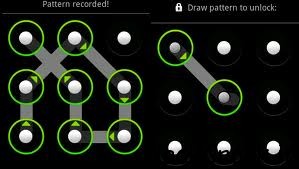
How To Unlock an Android Pattern

Today many android phone user use the inbuilt unlock pattern for give security to there phones this is very easy to use but some time to take many wrong attempts it locked permanently after that you need to enter the user id you enter in the google play store to unlock phone but there is some problems to unlock again if u stop data usage in your so it can’t be connected with internet and then you cannot unlock phone without this trick. sometime user needs to go to Samsung care center and then give some money to unlock it again so this is costly you need to pay here i gona give you a trick How To Unlock an Android Pattern  Just follow these simple steps to unlock your phone and use again free of cost.
  1. phone want you to enter the user email id you enter in the play store.
  2.  you don’t know the email id.
  3. Then just don’t worry just follow these steps.
  4. just switch off you android phone and then wait for second to switched of it.
  5. then first click Up Volume Key and hold it.
  6. then click on home button and hold it.
  7. then press the power button and after is started just release it.
  8. and then you can see you enter in the secret android menu you never see it before.
  9. just click on home button for up and down in the menu.
  10. then just go to third option named as DELETE ALL USER DATA.
  11. then it takes dome time.
  12. the phone will be started and the unlock patter problem is fixed.
  1. but the main prob is to do this it reset the phone . but it is the one and only trick to get regain access to you phone.
  2. also check Android Secrete Codes.

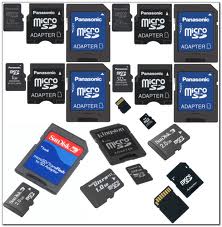
HOW TO RECOVER MEMORY CARD PASSWORD

If you have a Nokia mobile phone S60, S40 edition etc. and you have protected your memory card with passwordand forgotten.If one day suddenly you restore your phone , after that you find that your memory card is passwordprotected and shit ! You don’t know the password and have some important files & data in that, what will you do ? Don’t worry, I will show you the way by which you can unlock memory card’s password. If that trick will not work then sorry you can’t recover your memory card’s password & data but yes , I will tell you the other trick by which you can format your memory card and at-least recover your memory card to reuse.

STEP 1
Install the X-plore application in your nokia phone.
STEP 2

Now start your X-plore application and press 0(zero) button and select “show the system files”.This will make the X-plore application to show your system files.
STEP 3
After completing the above step goto C:/Sys/Data/ MmcStore
STEP 4
Now press 3 button from your keypad and you will see options.Now click on the Hex-viewer option.This will make your phone to show files in hexadecimal.
STEP 5
Look at the 3 rd Column On the screen you will see a code like ! TMSD02G (c??”?x???6?2?6 ?2?6).
Note down the numbers present between the ?. This is your memory card password.Like in this example the password is 62626.
STEP 6
Now you can enter the password and view your memory card files or you can reset your memory card password to a more memorable password.
Remember you can gain access to C:/Sys/Data/ if and only if you have set a password on your memory card

OR


1. If you have a Nokia s60 1st & 2nd edition phone you can find your memorycard’s forgotten password by following these steps:
  1. Download  and Install FExplorer.
  2. Insert card into your s60 1st or 2nd edition phone but don’t access it through phone.
  3. Run FExplorer and Open the path C:system.
  4. You will  find there a file named mmcstore , move this file to other location of your phone, rename the filemmcstore.txt
  5. Open the file in your phone or Copy that file(mmcstore.txt) to your pc and open that file in notepad.
  6. You will find your password in that file.
  7. By this way, you can unlock memory card and recover your memory card’s password.

2. Unlock Memory Card in Nokia s60 3rd edition:

While searching, I haven’t found any way to find password of Nokia s60 3rd edition phones. But in some s60 3rd edition phones & almost all E-series phones you can unlock your memory card by remote lock option. Follow these steps:-
  1. Activate remote lock option by going to Tools ↪ Settings ↪ Security ↪ Phone and SIM ↪ Allow remote lock menu. The password of your memory card will be your remote lock message.
  2. Send an sms containing your remote lock message that will automatically change your memory cardpassword.
3. YOU CAN USE YOUR JAVA PHONE TO FORMAT THE MEMORY CARD